Introduction
Online security matters more as people increasingly rely on digital services, mobile apps, online banking, and cloud platforms. Traditional passwords have protected online accounts for decades, but they also create security challenges. Weak passwords, stolen login credentials, phishing attacks, and repeated password reuse continue to put personal information at risk.
In 2027, passkey technology is expected to become an increasingly important part of digital authentication. Passkeys provide a passwordless login experience using technologies such as fingerprint recognition, facial recognition, and device-based authentication.
Major technology companies are supporting passwordless authentication to make online accounts more secure and easier to access. But how do passkeys work, and could they eventually replace traditional passwords?
Let’s explore everything you need to know about passkey technology.
What Are Passkeys?
Passkeys are modern digital authentication credentials that allow users to sign in to websites and applications without entering a traditional password.
Instead of remembering complicated passwords, users can verify their identity through a supported device. Depending on the device and service, authentication may involve:
- Fingerprint recognition
- Facial recognition
- Device PIN
- Screen lock authentication
- Secure hardware-based verification
Passkeys use public-key cryptography to protect login information. During registration, a device creates a cryptographic key pair. The private key remains securely stored on the user’s device or within an approved credential-management system, while the public key is registered with the online service.
When someone attempts to sign in, the service sends a cryptographic challenge. The user’s device verifies the request and uses the private key to generate a response.
This process allows websites to confirm account ownership without transmitting a traditional password.
How Does Passkey Technology Work?
The process generally includes four steps:
1. Creating a Passkey
When a website supports passkeys, users can choose to create a passkey instead of using a traditional password. Their device generates the necessary cryptographic credentials.
2. Secure Credential Storage
The private key is stored securely on the user’s device or within a supported credential manager. The website receives the corresponding public key.
3. Identity Verification
When users return to the website, they select the passkey login option. Their device requests identity verification through biometrics or another supported screen-lock method.
4. Completing Authentication
After successful verification, the device signs the authentication challenge. The website checks the response using the registered public key and grants access if the verification succeeds.
This approach helps protect users against many common password-related attacks.
Why Are Passkeys More Secure Than Traditional Passwords?
Traditional passwords have several weaknesses. Users often choose easy-to-remember combinations, reuse passwords across multiple websites, or accidentally share login information through phishing websites.
Passkeys address many of these problems.
1. Protection Against Phishing
Passkeys are designed to work with the website or application for which they were created. This makes it significantly harder for attackers to steal authentication credentials through fake login pages.
2. No Password Reuse
Users do not need to create or remember separate passwords for every supported service. Each passkey is associated with its specific account and service.
3. Strong Cryptographic Protection
Passkeys rely on public-key cryptography rather than sending passwords during authentication.
4. Easier Login Experience
Users can authenticate through fingerprint recognition, facial recognition, or their device’s screen lock instead of typing complicated passwords.
5. Reduced Credential Theft Risks
Because websites do not store users’ private passkey credentials as traditional passwords, certain database breaches become less useful to attackers.
Passkeys vs Traditional Passwords
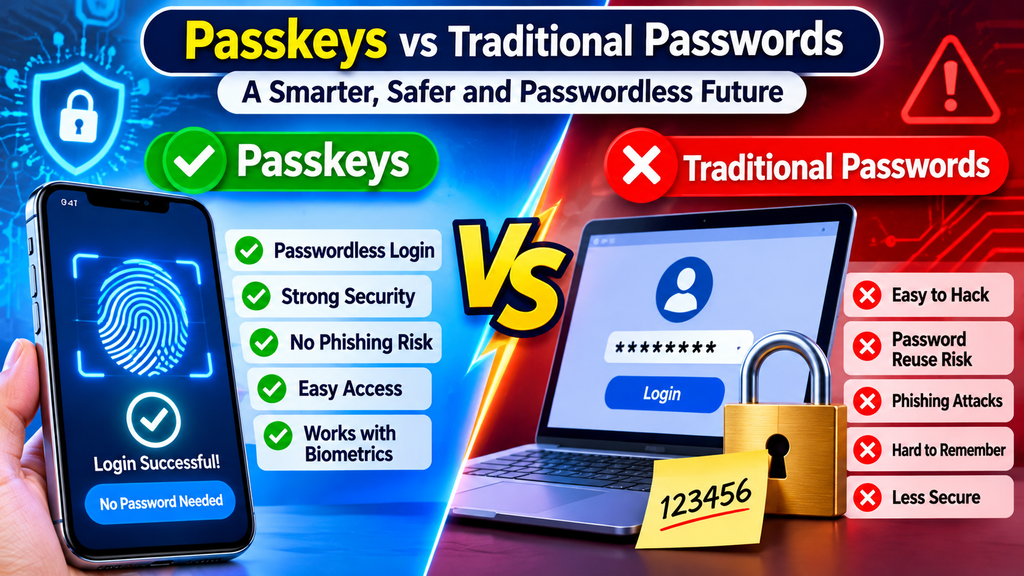
| Feature | Traditional Passwords | Passkeys |
|---|---|---|
| Login method | Typed password | Device authentication |
| Phishing protection | Limited | Stronger |
| Password memorization | Required | Not required |
| Credential storage | Server stores password verification data | Public key registered with service |
| Reuse risks | Common | Reduced |
| User experience | Can be complicated | Usually simpler |
| Authentication | Password-based | Cryptographic verification |
Passkeys provide important security advantages, although account recovery and device protection remain essential.
Companies Supporting Passkey Technology
Several major technology companies have introduced passkey support across their platforms.
Google supports passkeys for compatible Google accounts and services. Users can authenticate through supported devices using biometrics or screen-lock verification.
Apple
Apple provides passkey support through its operating systems and password-management features. Passkeys can synchronize across supported Apple devices through iCloud Keychain.
Microsoft
Microsoft supports passwordless authentication options, including passkeys, across compatible services and devices.
Other Online Platforms
Various websites, applications, financial services, and technology platforms are also adopting passkey authentication. Availability depends on the individual service and device.
Can Passkeys Completely Replace Passwords in 2027?
Passkeys have the potential to reduce dependence on traditional passwords, but a complete replacement is unlikely to happen everywhere at once.
Some websites still depend on older authentication systems. Other services must support different devices, operating systems, and account recovery methods.
Businesses also need time to update their security infrastructure and educate users about passwordless authentication.
During this transition, passwords and passkeys may continue to work together. Some platforms may also offer backup authentication methods to prevent users from losing account access.
Challenges of Passkey Technology
Although passkeys offer several advantages, the technology still has challenges.
Device Loss: Losing a smartphone or computer can create account-access problems if users have not configured synchronization or recovery options.
Platform Compatibility: Not every website, application, or device supports passkeys.
Account Recovery: Users need reliable recovery options if they lose access to their devices or credential managers.
User Awareness: Some people are unfamiliar with passwordless authentication and may need guidance when setting up their first passkey.
Shared Devices: Users must understand how passkeys are stored and managed when multiple people use the same computer or device.
These challenges highlight why secure recovery procedures and good account-management practices remain important.
How to Start Using Passkeys
Getting started with passkeys is relatively simple.
- Open a website or application that supports passkeys.
- Sign in to your existing account.
- Open the account security or login settings.
- Find the passkey option.
- Follow the instructions to create a passkey.
- Verify your identity using your device’s supported authentication method.
- Test the login process to confirm that everything works correctly.
Always keep your devices updated and make sure your account has a reliable recovery method.
The Future of Passwordless Authentication
Passkey technology represents an important development in online security. As more companies adopt passwordless authentication, users may find it easier to access digital services without remembering multiple passwords.
In the coming years, improvements in biometric authentication, device security, and cross-platform compatibility could make passkeys more accessible.
Businesses may also increasingly introduce passwordless login options to reduce phishing risks and improve customer experiences.
However, traditional passwords may remain available for older systems and services that have not adopted newer authentication standards.
The future of digital security will likely involve multiple authentication technologies working together.
As technology continues to evolve, passkeys could become one of the most important tools in modern cybersecurity.
Frequently Asked Questions (FAQs)
1. What is a passkey in simple terms?
A passkey is a digital login credential that allows users to access supported websites and applications without entering a traditional password.
2. Are passkeys safer than passwords?
Passkeys offer stronger protection against phishing and password theft because they use public-key cryptography and are associated with specific websites or services.
3. Can I use passkeys on my smartphone?
Yes. Supported Android and Apple devices can create and use passkeys through compatible authentication and credential-management systems.
4. What happens if I lose my phone?
You may be able to recover access through a synchronized credential manager, another registered device, or the service’s account recovery process.
5. Do passkeys require fingerprint recognition?
No. Depending on the device, users can authenticate with facial recognition, fingerprint recognition, a PIN, or another supported screen-lock method.
6. Will passwords disappear in 2027?
Not completely. Passkeys are becoming more widely adopted, but traditional passwords will likely remain available on many platforms during the transition.
7. Are passkeys free to use?
Creating and using passkeys is generally free on supported services and devices. However, normal device, internet, or service costs may still apply.
Conclusion
Passkeys are changing how people access websites, applications, and digital accounts. By combining public-key cryptography with device-based authentication, they provide a convenient alternative to traditional passwords.
Although passkeys may not replace every password immediately, their growing adoption could significantly improve online security in 2027 and beyond.
For individuals and businesses, understanding passwordless authentication is an important step toward safer digital experiences.
Passkey Technology 2027, Passwordless Authentication, What Are Passkeys, Passkey Security, Biometric Authentication, Online Account Security, Future of Passwords, Digital Authentication, Cybersecurity Technology 2027, Google Passkeys, Apple Passkeys, Digital Privacy, Technology Trends, Software and Apps
Passkey Technology, Passwordless Authentication, Cybersecurity 2027, Online Security, Biometric Authentication, Digital Privacy, Google Passkeys, Apple Passkeys, Technology Trends, Software and Apps